အခန်း ၆ :: Design to Reliable Code

Requirement လည်း ရှိပြီ။ Design Architecture လည်း ရှိပြီ။ အခုနောက်တဆင့် အနေနဲ့ Code Development လုပ်ရပါမယ်။ ဒီအဆင့်က SDLC မှာ အကြာဆုံး အဆင့်ပါ။
Software တစ်ခုဟာ နေ့ခြင်း ညခြင်း ဖြစ်မလာပါဘူး။ ဥပမာ လူတစ်ယောက် develop လုပ်မယ် ဆိုရင် ၁ လ ကြာမယ်။ လူ အယောက် ၃၀ လုပ်မယ် ဆိုရင် ၁ ရက် တည်းနဲ့ ပြီးမယ် ဆိုပြီး တွက်လို့ မရပါဘူး။ Fred Brooks ရဲ့ The Mythical Man-Month စာအုပ်မှာ ဖော်ပြထားတဲ့ Brooks' Law အရ 'နောက်ကျနေတဲ့ Software Project တစ်ခုထဲကို လူအင်အား ထပ်ဖြည့်ခြင်းဟာ Project ကို ပိုပြီး နောက်ကျစေတယ်' လို့ ဆိုပါတယ်။ ဘာကြောင့်လဲဆိုတော့ လူသစ်တွေအတွက် Training ပေးရတဲ့ အချိန်နဲ့ Communication ရှုပ်ထွေးလာတာကြောင့် ဖြစ်ပါတယ်။
ဒီအဆင့် မှာ developer ဘယ်နှစ်ယောက် လိုသလဲ။ ဘယ်လို dependency တွေ ရှိလဲ ဆိုတာကို နားလည် ရမယ်။ ဥပမာ User register နဲ့ login မပြီးပဲ နောက်ဘက်က invoie စနစ်ကို ထုတ်ပေးလို့မရဘူး။ ဒီအဆင့်မှာ Software တစ်ခု ရဲ့ Quality ကောင်းကောင်း နှင့် ,Maintainable code တွေ ဖြစ်နေဖို့ လိုတယ်။ မဟုတ်ခဲ့ရင် နောက်ထပ် version တစ်ခု အတွက် အစ ကနေ ပြန်ရေးရတာတွေ ။ နောက်ဆိုရင် မထိချင် တော့တာတွေ ဖြစ်လာလိမ့်မယ်။ Quality မကောင်းခဲ့ရင် Maintain လုပ်ရတာ ခက်ရင် ဒီ software ကို feature အသစ်ထည့်ဖို့ team တစ်ခုလုံးက လက်တွန့် ပါလိမ့်မယ်။ တစ်ခုခု ပြင်လိုက်မှ အကုန်လုံး ပျက်စီး သွားတာ မျိုးတွေ ဖြစ်တတ်ပါတယ်။
၆.၁ From Design to Code: The Implementation Challenge
Design ကို Code အဖြစ် ပြောင်းလဲခြင်းက စာကူးချသလို (Copy-Paste) လွယ်ကူတဲ့ ကိစ္စတော့ မဟုတ်ပါဘူး။ Developer တွေဟာ Design Document တွေကို roadmap အဖြစ် အသုံးပြုပြီး အကောင်းဆုံး Implementation ကို စဉ်းစား ရွေးချယ်ရပါတယ်။ ဒီအဆင့်မှာ အဓိက ကြုံရတဲ့ စိန်ခေါ်မှုတွေကတော့ -
- Design အတိုင်း အကောင်အထည်ဖော်ခြင်း: Architect တွေ ရေးဆွဲထားတဲ့ Architecture နဲ့ Design Pattern တွေကို မျက်ခြေမပြတ်ဘဲ တိကျစွာ လိုက်နာဖို့ လိုပါတယ်။
- Complexity ကို စီမံခန့်ခွဲခြင်း: Class တွေ၊ Function တွေ၊ Module တွေ များလာတာနဲ့အမျှ ရှုပ်ထွေးမလာအောင် ထိန်းသိမ်းရတာကလည်း အနုပညာ တစ်ခုပါပဲ။
- အရည်အသွေးကို အာမခံခြင်း: ရေးလိုက်တဲ့ Code တိုင်းဟာ အလုပ်ဖြစ်ရုံ သက်သက် မဟုတ်ဘဲ၊ မှန်ကန်မှု ၊ Efficiency၊ နဲ့ Security စံနှုန်းတွေနဲ့ ကိုက်ညီနေဖို့ လိုပါတယ်။
- Handling Ambiguity (မရေရာမှုများကို ဖြေရှင်းခြင်း): Design Document တွေဟာ ဘယ်လောက်ပဲ ပြည့်စုံတယ် ပြောပြော၊ Code ရေးတဲ့အခါမှာ မရေရာတဲ့ အချက်တွေ (Ambiguities)၊ လိုအပ်ချက် ကွက်လပ်တွေ (Gaps) အမြဲ တွေ့ရစမြဲပါ။ Developer ဟာ ဒီကွက်လပ်တွေကို Architect တွေ Product Owner တွေနဲ့ တိုင်ပင်ပြီး ဖြည့်ဆည်းရပါတယ်။
- Technical Debt (နည်းပညာ ကြွေးမြီ) ကို ရှောင်ရှားခြင်း: အမြန်ပြီးဖို့အတွက် "Quick Fix" တွေ၊ ယာယီဖြေရှင်းနည်း (Hack) တွေ သုံးလိုက်ရင် နောင်တစ်ချိန်မှာ အတိုးနဲ့ ပြန်ပေးဆပ်ရတဲ့ Technical Debt တွေ ဖြစ်လာတတ်ပါတယ်။ ဒါကို Design အဆင့်ကတည်းက သတိထားပြီး Reliable Code ဖြစ်အောင် ရေးသားရတာကလည်း စိန်ခေါ်မှုတစ်ခုပါ။
၆.၂ Essential Tooling: Advanced Version Control with Git
Developer တစ်ယောက် ဖြစ်လာပြီဆိုရင် မသိမဖြစ် သိထားရမယ့် Tool ကတော့ Version Control System (VCS) ပါပဲ။ သူက အချိန်နဲ့အမျှ ပြောင်းလဲသွားတဲ့ File တွေရဲ့ အပြောင်းအလဲ မှတ်တမ်း (History) ကို စနစ်တကျ သိမ်းဆည်းပေးထားပါတယ်။ ဒါမှသာ အမှားတစ်ခုခု ပါသွားရင်တောင် အရင် Version အဟောင်းကို ပြန်သွားလို့ ရမှာပါ။
Git ကတော့ ဒီနေ့ခေတ်မှာ Industry Standard ဖြစ်နေတဲ့ Distributed Version Control System တစ်ခုပါ။ Git က Developer တွေကို ဘာတွေ ကူညီပေးနိုင်လဲဆိုတော့ -
- Collaboration: Team member တွေ အများကြီး Project တစ်ခုတည်းမှာ ပြဿနာ (Conflict) မရှိဘဲ တပြိုင်နက် အလုပ်လုပ်နိုင်တယ်။
- Tracking Changes: Code တစ်ကြောင်းချင်းစီကို ဘယ်သူက၊ ဘယ်အချိန်မှာ၊ ဘာကြောင့် ပြင်ခဲ့လဲ ဆိုတာကို ခြေရာခံနိုင်တယ်။
- Branching and Merging: Feature အသစ်တွေ ရေးချင်ရင် လက်ရှိ Code အကောင်းကြီးကို သွားမထိဘဲ၊ သီးသန့် လမ်းကြောင်း (Branch) ခွဲပြီး ရေးလို့ရတယ်။ ပြီးမှ ပြန်ပေါင်း (Merge) လိုက်ရုံပါပဲ။
၆.၂.၁ Feature Branch Workflow
Team နဲ့ အလုပ်လုပ်တဲ့အခါ အသုံးအများဆုံး Workflow ကတော့ Feature Branch Workflow ဖြစ်ပါတယ်။
- Project ရဲ့ တည်ငြိမ်တဲ့ Version ကို
main(သို့မဟုတ်master) branch မှာ ထားပါတယ်။ - Feature အသစ် တစ်ခု လုပ်တော့မယ်ဆိုရင်
mainကနေ Feature Branch အသစ်တစ်ခု (ဥပမာ-feature/user-login) ခွဲထုတ်လိုက်ပါတယ်။ - Developer က အဲဒီ Branch ပေါ်မှာပဲ စိတ်ကြိုက် Code ရေး၊ Commit လုပ်ပါတယ်။
- ပြီးသွားရင်
mainထဲကို ချက်ချင်း မပေါင်းပါဘူး။ Pull Request (PR) (သို့မဟုတ် Merge Request) တင်ရပါတယ်။ - အခြား Team member တွေက PR ကို ဝင်စစ်ဆေး (Code Review) ပြီး Feedback ပေးပါတယ်။
- အားလုံး အဆင်ပြေပြီ၊ သဘောတူပြီ ဆိုမှ Feature Branch ကို
mainbranch ထဲကို Merge လုပ်ပါတယ်။
ဒီနည်းလမ်းက Code Quality ကို ထိန်းသိမ်းပေးသလို၊ Main Branch ကိုလည်း အမြဲတမ်း Stable ဖြစ်နေစေပါတယ်။
gitGraph
    commit id: "Initial Commit"
    branch feature-login
    commit id: "feat: Add login form" type: HIGHLIGHT
    commit id: "feat: Add password validation" type: HIGHLIGHT
    checkout main
    commit id: "fix: Hotfix on main" type: REVERSE
    branch feature-register
    commit id: "feat: Add register page" type: HIGHLIGHT
    checkout main
    merge feature-login
    checkout feature-register
    commit id: "feat: Add email service" type: HIGHLIGHT
    checkout main
    merge feature-register
Merge vs. Rebase
Git မှာ Branch တွေကို ပြန်ပေါင်းတဲ့အခါ Merge နဲ့ Rebase ဆိုပြီး နည်းလမ်း (၂) မျိုး ရှိပါတယ်။ Developer တော်တော်များများ ဒီနှစ်ခုကို ရောထွေးတတ်ကြပါတယ်။
Before Merge and Rebase
မူလအခြေအနေမှာ main branch နဲ့ feature branch ဘယ်လိုကွဲထွက်နေလဲ ဆိုတာ ကြည့်ကြည့်ရအောင်။
gitGraph
   commit id: "A"
   commit id: "B"
   branch feature
   commit id: "C"
   commit id: "D"
   checkout main
   commit id: "E"
   commit id: "F"
Merge
ဒါကတော့ သမိုင်းကြောင်း (History) ကို အရှိအတိုင်း သိမ်းထားတာပါ။ Branch နှစ်ခု ပေါင်းသွားတဲ့ နေရာမှာ "Merge Commit" (G) တစ်ခု ပေါ်လာပါမယ်။ History လမ်းကြောင်းတွေ ခွဲထွက်သွားတာ၊ ပြန်ပေါင်းတာတွေ ရှုပ်ထွေးနိုင်ပေမယ့်၊ ဘာဖြစ်ခဲ့လဲဆိုတာကို အမှန်အတိုင်း (Non-destructive) မြင်ရပါတယ်။
gitGraph
   commit id: "A"
   commit id: "B"
   branch feature
   commit id: "C"
   commit id: "D"
   checkout main
   commit id: "E"
   commit id: "F"
   merge feature id: "G"
Example
$ (main)    : git checkout main
$ (main)    : git merge feature
Rebase
ဒါကတော့ History ကို ပြန်ပြင်ရေးလိုက်တာပါ။ ကိုယ့် Feature Branch ရဲ့ အစ (Base) ကို Main Branch ရဲ့ နောက်ဆုံးအခြေအနေ (Latest Commit) ဆီ ရွှေ့လိုက်တာပါ။ ရလဒ်ကတော့ မျဉ်းဖြောင့်အတိုင်း (Linear History) ဖြစ်သွားပြီး ကြည့်ရ ရှင်းလင်းပါတယ်။
gitGraph
   commit id: "A"
   commit id: "B"
   commit id: "E"
   commit id: "F"
   branch feature
   commit id: "C'"
   commit id: "D'"
   checkout main
   merge feature
Rebase လုပ်တယ်ဆိုတာ Feature branch က commit တစ်ခုချင်းစီကို Main branch ရဲ့ ထိပ်ဆုံးမှာ ပြန်စီ (Re-apply) လိုက်တာပါ။ ဒါကြောင့် Conflict ဖြစ်နိုင်ခြေလည်း ရှိပါတယ်။ Rebase က ကိုယ့်ရဲ့ Branch history ကို ရှင်းလင်းစေပါတယ်။
ဒီဥပမာမှာ ဆိုရင် မူလက A, B ကနေ C, D ခွဲထွက်သွားတာပါ။ Rebase လုပ်လိုက်တဲ့အခါ Main branch မှာရှိတဲ့ A, B, E, F ပြီးမှ Feature branch က commit တွေကို လာဆက်တာဖြစ်သွားပါမယ်။ အစီအစဉ်က A -> B -> E -> F -> C' -> D' ဖြစ်သွားပါမယ်။
- Conflict ရှိခဲ့ရင် Commit တစ်ခုချင်းစီ (C မှာတစ်ခါ၊ D မှာတစ်ခါ) ရှင်းပေးရပါမယ်။
- နောက်ဆုံးရလဒ်မှာ Merge လုပ်သလိုမျိုး "Merge Commit" (G) သီးသန့် ရှိမနေတော့ဘဲ မျဉ်းဖြောင့်အတိုင်း သပ်ရပ်သွားပါမယ်။
Example
$ (main)    : git checkout feature
$ (feature) : git rebase main
$ (feature) : git checkout main
$ (main)    : git merge feature
ဘယ်ဟာကို သုံးမလဲ?
Public Branch (e.g., main) ပေါ်မှာ ဘယ်တော့မှ Rebase မလုပ်ပါနဲ့။ History တွေ ပြောင်းလဲသွားပြီး အခြား Developer တွေရဲ့ Code တွေနဲ့ ရှုပ်ထွေးကုန်နိုင်လို့ပါ။
မလုပ်ရ
$ (main) : git rebase feature
ကိုယ့် Private Feature Branch မှာတော့ Main နဲ့ ပြန်မပေါင်းခင် Rebase လုပ်တာ ကောင်းပါတယ်။ History ရှင်းလင်းပြီး ဖတ်ရလွယ်ကူစေပါတယ်။
လုပ်လို့ရသည်
$ (feature) : git rebase main
၆.၂.၂ Commit Message Standards (Conventional Commits)
Git သုံးတဲ့အခါ Developer အများစု လုပ်လေ့ရှိတဲ့ အမှားကတော့ Commit Message ကို ပေါ့ပေါ့ဆဆ ရေးတာပါပဲ။ fixed bug, wip, update ဆိုတဲ့ Message တွေက ပြန်ဖတ်တဲ့အခါ ဘာမှ အဓိပ္ပာယ် မရှိပါဘူး။ Project ကြီးလာတာနဲ့အမျှ History ကို ပြန်ကြည့်ပြီး ပြဿနာရှာတဲ့အခါ Commit Message ကောင်းကောင်း ရေးထားခြင်းက အသက်ပါပဲ။
ဒီအတွက် Conventional Commits ဆိုတဲ့ Standard ကို လိုက်နာသင့်ပါတယ်။ ပုံစံကတော့ -
<type>(<scope>): <subject>
ဖြစ်ပါတယ်။
အသုံးများသော Type များ:
- feat: Feature အသစ်တစ်ခု ထည့်တဲ့အခါ (ဥပမာ -
feat: add google login support) - fix: Bug တစ်ခုခု ပြင်တဲ့အခါ (ဥပမာ -
fix: resolve crash on checkout page) - docs: Documentation ပြင်တဲ့အခါ (README, API docs)
- style: Logic အပြောင်းအလဲ မဟုတ်ဘဲ Formatting, Semicolon ပြင်တာမျိုး
- refactor: Bug fix လည်း မဟုတ်၊ Feature လည်း မဟုတ်ဘဲ Code ကို သန့်ရှင်းအောင် ပြင်ရေးတာမျိုး
- test: Test code တွေ ထပ်ဖြည့်တာ၊ ပြင်တာမျိုး
- chore: Build process တွေ၊ Library update လုပ်တာတွေ
Semantic Versioning နှင့် ချိတ်ဆက်ခြင်း
ဒီလို စနစ်တကျ ရေးသားခြင်းအားဖြင့် Software Version (ဥပမာ v1.0.0) သတ်မှတ်တဲ့အခါ Semantic Versioning နဲ့ အလိုအလျောက် ချိတ်ဆက်လို့ ရသွားပါတယ်။
- MAJOR version (v2.0.0):
BREAKING CHANGEပါရင် တိုးသည်။ - MINOR version (v1.1.0):
featပါရင် တိုးသည်။ - PATCH version (v1.0.1):
fixပါရင် တိုးသည်။
ဒါကြောင့် Commit Message ကောင်းကောင်းရေးတာဟာ Professional Developer တစ်ယောက်ရဲ့ အရည်အချင်းတစ်ခု ဖြစ်ပါတယ်။
၆.၃ Dependency Management: Standing on the Shoulders of Giants
ခေတ်မီ Software Construction မှာ Code အားလုံးကို ကိုယ်တိုင် ရေးစရာ မလိုပါဘူး။ Open Source Library တွေ၊ Framework တွေကို ယူသုံးကြပါတယ်။ ဒါကို Dependency Management လို့ ခေါ်ပါတယ်။ Node.js မှာ npm, Python မှာ pip, Java မှာ Maven/Gradle စတာတွေပေါ့။
Semantic Versioning (SemVer)
Library တွေကို သုံးတဲ့အခါ Version နံပါတ်တွေက အရေးကြီးပါတယ်။ အများအားဖြင့် Major.Minor.Patch (ဥပမာ - 2.14.3) ပုံစံကို သုံးကြပါတယ်။
- Major (2): Breaking Change. ဒီ Version ပြောင်းရင် ကိုယ့် Code တွေ ပြင်ရနိုင်တယ်။ (ဥပမာ - API နာမည် ပြောင်းသွားတာ)
- Minor (14): New Feature. Feature အသစ်တွေ ပါလာမယ်၊ ဒါပေမဲ့ ရှေ့ Version နဲ့ တွဲသုံးလို့ ရသေးတယ်။
- Patch (3): Bug Fix. အမှားပြင်ဆင်မှုတွေပဲ ပါမယ်။ ဘာမှ ပြောင်းလဲစရာ မလိုဘူး။
The Risk of Dependencies
Library တွေ သုံးတာ မြန်ပေမယ့် အန္တရာယ်လည်း ရှိပါတယ်။
- Security Vulnerabilities: ကိုယ်သုံးတဲ့ Library မှာ ဟာကွက် ရှိနေရင်၊ ကိုယ့် Software ပါ ဟာကွက် ရှိသွားမှာပါ။ (ဥပမာ - Log4j ပြဿနာ)
- Breaking Changes: Library update လုပ်လိုက်တာနဲ့ ကိုယ့် Code တွေ Error တက်သွားတာမျိုးပါ။ ဒါကြောင့်
package-lock.jsonသို့မဟုတ်yarn.lockလို file တွေက အရေးကြီးပါတယ်။ သူတို့က Version အတိအကျကို မှတ်ထားပေးလို့ပါ။ - Dependency Hell: ဒါကတော့ အရှုပ်ထွေးဆုံး ပြဿနာပါ။ ဥပမာ - ကိုယ်သုံးထားတဲ့ Library A က Library C (Version 1.0) ကို လိုအပ်နေပြီး၊ နောက်ထပ် သုံးထားတဲ့ Library B ကတော့ Library C (Version 2.0) ကို လိုအပ်နေတဲ့ အခြေအနေမျိုးပါ။ အဲဒီအခါ Version မကိုက်ညီမှု (Version Conflict) တွေ ဖြစ်ပြီး ဖြေရှင်းရ ခက်ခဲတတ်ပါတယ်။
၆.၄ Coding Standards, Code Quality, and Technical Debt
Coding Standards
ဘောလုံးကန်ရင် စည်းကမ်း ရှိသလို၊ Code ရေးရင်လည်း စည်းကမ်း ရှိဖို့ လိုပါတယ်။ Coding Standard ဆိုတာ Team တစ်ခုလုံး လိုက်နာဖို့ သဘောတူထားတဲ့ စည်းမျဉ်း (Set of Rules) တွေပါ။
Software Engineering မှာ နာမည်ကြီးတဲ့ ဆိုရိုးစကား တစ်ခုရှိပါတယ်။ "Code is read much more often than it is written." (Code ကို ရေးရတာထက် ပြန်ဖတ်ရတဲ့ အကြိမ်ရေက ပိုများတယ်)။ ဒါကြောင့် Coding Standard တစ်ခုကို လိုက်နာခြင်းအားဖြင့် -
- Consistency: Code Base တစ်ခုလုံးက လူအများကြီး ဝိုင်းရေးထားပေမယ့် လူတစ်ယောက်တည်း ရေးထားသလိုမျိုး တပြေးညီ ဖြစ်နေစေပါတယ်။
- Cognitive Load: Code ဖတ်တဲ့သူအဖို့ Variable နာမည်ပေးပုံတွေ၊ ကွင်းစကွင်းပိတ် ထားပုံတွေ မတူညီတာကို လိုက်ကြည့်နေရတဲ့ ဦးနှောက်ဝန်ပိမှု (Cognitive Load) ကို လျှော့ချပေးပါတယ်။ Logic ပေါ်မှာပဲ အာရုံစိုက်လို့ ရသွားပါတယ်။
- Onboarding: Team member အသစ် ရောက်လာရင်လည်း Project ရဲ့ Style ကို လေ့လာရတာ ပိုမြန်ဆန်စေပါတယ်။
ဘာတွေကို သတ်မှတ်လေ့ရှိလဲ?
- Naming Convention: Variable နဲ့ Function နာမည်ပေးပုံ (camelCase, PascalCase)။
- Formatting: Indentation၊ Spacing၊ Semicolon ထည့်မထည့်။
- TypeScript Specifics:
anytype ကို ပေးသုံးမလား၊ Return type တွေကို Explicit ရေးခိုင်းမလား စသဖြင့်။
Example: Inconsistent vs. Standardized (TypeScript)
Without Standard (ဖတ်ရခက်၊ Type Safety မရှိ)
// Naming မမှန်၊ 'any' type သုံးထား၊ Indentation မညီ
function c(x: any,y: any){
var d=x+y; return d;
    }
With Standard (ရှင်းလင်း၊ Type Safe ဖြစ်)
// Descriptive Naming၊ Explicit Types၊ Consistent Spacing
function calculateTotal(price: number, tax: number): number {
  const total = price + tax;
  return total;
}
Automation Tools
လူက လိုက်စစ်နေရင် အချိန်ကုန်သလို ငြင်းခုံစရာတွေ ဖြစ်နိုင်ပါတယ်။ ဒါကြောင့် စက်ကိုပဲ စစ်ခိုင်းကြပါတယ်။
- Linters (ဥပမာ - ESLint): Code ရဲ့ အမှားတွေ၊ Quality ပိုင်းဆိုင်ရာ စည်းကမ်းတွေကို စစ်ပေးပါတယ်။ TypeScript မှာဆိုရင်
no-explicit-any(any မသုံးရ) လို Rule မျိုးတွေ ထည့်ထားလို့ ရပါတယ်။ - Formatters (ဥပမာ - Prettier): Code ရဲ့ Indentation, Spacing ကို Save နှိပ်လိုက်တာနဲ့ Auto ပြင်ပေးပါတယ်။
Google, Airbnb တို့လို ကုမ္ပဏီကြီးတွေမှာ ကိုယ်ပိုင် Style Guide တွေ ရှိကြပြီး၊ Open Source အနေနဲ့လည်း ယူသုံးလေ့ ရှိကြပါတယ်။
ဒါကြောင့် ကုမ္ပဏီအသစ် သို့မဟုတ် Project အသစ်တစ်ခုတွင် စတင် ဝင်ရောက်လုပ်ကိုင်သည့်အခါ လက်ရှိ အသုံးပြုနေသော Coding Standard နှင့် ပတ်သက်၍ မေးမြန်းလေ့လာခြင်းသည် မရှိမဖြစ် လုပ်ဆောင်သင့်သော အရာဖြစ်ပါတယ်။ မိမိ၏ ကိုယ်ပိုင် Style နှင့် Team ၏ Standard ကွဲလွဲနေပါက Code Review ပြုလုပ်ရာတွင် အခက်အခဲများ ရှိလာနိုင်ပါတယ်။
Code Review Checklist
Pull Request (PR) တစ်ခုကို စစ်ဆေးရာတွင် Team Member များအနေဖြင့် အောက်ပါ အချက်များကို အဓိကထား စစ်ဆေးသင့်ပါသည်။
- Functionality: Code သည် ရည်ရွယ်ထားသော လုပ်ဆောင်ချက်ကို ပြည့်ဝစွာ လုပ်ဆောင်နိုင်ခြင်း ရှိမရှိနှင့် Edge Case (ဥပမာ - Data မရှိသော အခြေအနေ) များကို ထည့်သွင်း စဉ်းစားထားခြင်း ရှိမရှိ။
- Readability: Code သည် ဖတ်ရှုရ လွယ်ကူရှင်းလင်းမှု ရှိမရှိနှင့် Naming များသည် သင့်လျော်မှန်ကန်မှု ရှိမရှိ။
- Security: User Input များကို စစ်ဆေးထားခြင်း (Validation) ရှိမရှိနှင့် Sensitive Data (ဥပမာ - Password) များကို Log ထဲတွင် မှတ်တမ်းတင်မိခြင်း ရှိမရှိ။
- Tests: Unit Test များ ရေးသားထားခြင်း ရှိမရှိနှင့် ရေးသားထားသော Test များသည် Pass ဖြစ်ခြင်း ရှိမရှိ။
Technical Debt
Technical Debt (နည်းပညာဆိုင်ရာ အကြွေး) ဆိုတာကတော့ Software Development တွင် အရေးကြီးသော Concept တစ်ခုပါ။ လုပ်ငန်းပြီးမြောက်ရန် အလျင်လိုမှုကြောင့် ရေရှည်အတွက် ကောင်းမွန်သော နည်းလမ်းကို မသုံးဘဲ၊ လက်တလော အဆင်ပြေမည့် နည်းလမ်း (Quick and Dirty Solution) ကို ရွေးချယ်လိုက်ခြင်းသည် အကြွေးယူလိုက်ခြင်းနှင့် တူပါသည်။
ရေတိုကာလတွင် လုပ်ငန်း ပြီးမြောက်မှု မြန်ဆန်နိုင်သော်လည်း၊ ရေရှည်တွင် ထို Code ကို ပြန်လည် ပြင်ဆင်ရန် (Refactor) အချိန် ပေးရမည် ဖြစ်သည်။ ၎င်းကို "အကြွေးဆပ်ခြင်း" ဟု တင်စားပါသည်။ အကယ်၍ အကြွေးမဆပ်ဘဲ ဆက်လက် ထားရှိပါက "အတိုး" များ ပွားလာသကဲ့သို့ ဖြစ်လာပြီး၊ နောက်ပိုင်းတွင် Feature အသစ်များ ထပ်မံထည့်သွင်းရန် ခက်ခဲလာခြင်းနှင့် Bug များ ပိုမို များပြားလာခြင်းတို့ ကြုံတွေ့ရနိုင်ပါသည်။
Technical Debt များလာသည့် အခါမှာ Project ကို မထိချင်တော့ဘဲ အစကနေ ပြန်ပဲ ရေးချင်တာတွေ ဖြစ်လာတတ်ပါတယ်။ ဒါကြောင့် Feature အသစ်တစ်ခု မစခင် အချိန်ပေးပြီး Technical Debt တွေကို ရှင်းသင့်ပါတယ်။ အရေးကြီးတာက မရှင်းခင်မှာ Unit Test တွေ ရေးထားဖို့ပါ။ Refactor လုပ်လိုက်သည့် အခါမှာ Function တွေ အလုပ်မလုပ်တော့တာကို ချက်ချင်း သိနိုင်ဖို့ လိုပါတယ်။ ပြင်လိုက်သည့် အတွက် Software တစ်ခုလုံး သုံးမရ ဖြစ်သွားတာမျိုး မဖြစ်စေဖို့လည်း လိုအပ်ပါတယ်။
The Duct Tape Programmer
Technical Debt နှင့် Coding Quality အကြောင်း ပြောမည် ဆိုလျှင် Duct Tape Programmer အကြောင်းကိုလည်း ချန်လှပ်ထား၍ မရနိုင်ပါ။ ဤ Concept ကို နာမည်ကျော် Software Engineer တစ်ဦးဖြစ်သူ Joel Spolsky က မိတ်ဆက်ခဲ့ခြင်း ဖြစ်ပါသည်။
Duct Tape Programmer ဆိုသည်မှာ Code ၏ အလှအပ၊ Architecture နှင့် Design Pattern များ ပြီးပြည့်စုံမှု (Perfection) ထက်၊ အလုပ်ပြီးမြောက်မှု (Shipping the Product) ကို ဦးစားပေးသူများ ဖြစ်ပါသည်။
သူတို့၏ အားသာချက်မှာ -
- Shipping is a feature: သူတို့သည် ပြီးပြည့်စုံမည့် အချိန်ကို ထိုင်မစောင့်ဘဲ၊ အလုပ်ဖြစ်မည့် နည်းလမ်း (Duct Tape) ကို သုံးကာ Product ကို အမြန်ဆုံး အသုံးပြုသူလက်ထဲ ရောက်အောင် ပို့ဆောင်ပေးနိုင်ပါသည်။
- Focus on Value: Code ဘယ်လောက် လှပသလဲ ဆိုတာထက်၊ ဒီ Code က အသုံးပြုသူ၏ ပြဿနာကို ဖြေရှင်းပေးနိုင်သလား ဆိုတာကိုသာ အဓိကထားပါသည်။
- Avoid Over-engineering: မလိုအပ်ဘဲ ရှုပ်ထွေးအောင် လုပ်နေမည့်အစား ရိုးရှင်းပြီး ထိရောက်မည့် နည်းလမ်းကိုသာ ရွေးချယ်တတ်ကြသည်။
သို့သော် သတိပြုရမည်မှာ Duct Tape Programmer ဖြစ်ခြင်းသည် "Code ညံ့ဖျင်းစွာ ရေးခြင်း" (Writing Bad Code) နှင့် မတူညီပါ။ ၎င်းသည် အခြေအနေနှင့် အချိန်အခါအရ မှန်ကန်သော ဆုံးဖြတ်ချက်ကို ချပြီး Technical Debt ယူသင့်လျှင် ယူလိုက်ခြင်းသာ ဖြစ်ပါသည်။
Software Engineering တွင် ဤနေရာ၌ ချိန်ခွင်လျှာ ညှိရန် လိုအပ်ပါသည်။ အမြဲတမ်း Duct Tape ကိုသာ သုံးနေပါက ပြန်လည်ပြင်ဆင်ရန် ခက်ခဲသော Spaghetti Code များ ဖြစ်လာနိုင်ပြီး၊ အမြဲတမ်း Perfectionist ဖြစ်နေပါကလည်း Product ထွက်လာမည် မဟုတ်ပါ။
ထို့ကြောင့် Professional Developer တစ်ယောက်အနေဖြင့် Coding Standard ကို လိုက်နာရမည် ဖြစ်သော်လည်း၊ လိုအပ်လာပါက Duct Tape Programmer ကဲ့သို့ လက်တွေ့ဆန်သော ဆုံးဖြတ်ချက်များကို ချမှတ်နိုင်စွမ်း ရှိရပါမည်။
၆.၅ AI-Assisted Construction & The Era of "Vibe Coding"
ဒီစာရေးချိန် ၂၀၂၅ ဒီဇင်ဘာလ မှာ Software Developement လောကတွင် ကြီးမားသော အပြောင်းအလဲ (Paradigm Shift) တစ်ခု ဖြစ်ပေါ်နေပါတယ်။ ယခင်က Developer တစ်ယောက်သည် Code များကို တစ်ကြောင်းချင်း ကိုယ်တိုင် စဉ်းစား၊ ကိုယ်တိုင် ရိုက်ထည့် (Type) ရသော "Manual Coding" ခေတ်ဖြစ်ခဲ့သော်လည်း၊ ယခုအခါတွင် GitHub Copilot, Cursor, Gemini ကဲ့သို့သော AI-powered Tools များကို အသုံးပြု၍ တည်ဆောက်သော ခေတ်သို့ ရောက်ရှိလာခဲ့ပါပြီ။
ဤအပြောင်းအလဲသည် Developer များနှင့် Code အကြား ဆက်ဆံပုံကိုပါ ပြောင်းလဲစေခဲ့ပြီး "Vibe Coding" ဟူသော ဝေါဟာရသစ် တစ်ခု ပေါ်ထွက်လာစေခဲ့သည်။
What is Vibe Coding?
Vibe Coding ဆိုသည်မှာ Code ၏ Syntax မှန်ကန်ရေး၊ အသေးစိတ် Logic ရေးသားရေးထက် မိမိ လိုချင်သော ရလဒ် (Intention) ကို AI အား ပြောပြပြီး၊ ရလာသော ရလဒ်သည် မိမိ လိုချင်သော ပုံစံ (Vibe) နှင့် ကိုက်ညီမှု ရှိမရှိ စစ်ဆေးကာ လျင်မြန်စွာ တည်ဆောက်သော လုပ်နည်းလုပ်ဟန် ဖြစ်သည်။
AI Researcher တစ်ဦးဖြစ်သူ Andrej Karpathy က "ယနေ့ခေတ်တွင် ကျွန်ုပ် Code မရေးတော့ပါ။ Prompt ရေးသည်၊ Code ကို Copy ကူးသည်၊ Run ကြည့်သည်၊ Error တက်လျှင် ပြန်ထည့်ပေးသည်။ ၎င်းသည် Vibe Coding ဖြစ်သည်" ဟု တင်စားခဲ့ဖူးပါသည်။
From Writer to Manager (Developer ၏ အခန်းကဏ္ဍ အပြောင်းအလဲ)
ဤစနစ်တွင် Developer ၏ နေရာသည် သိသိသာသာ ပြောင်းလဲသွားပါသည်။
- The Writer (ယခင်): Developer သည် စာရေးဆရာ (Writer) ကဲ့သို့ ဖြစ်သည်။ Variable နာမည်မှစ၍ Logic အဆုံး ကိုယ်တိုင် ရေးသားရသည်။ Syntax Error တစ်ခု၊ Semicolon တစ်ခု မှားသည်နှင့် အလုပ်မလုပ်တော့ပေ။
- The Manager / Editor (ယခု): Developer သည် မန်နေဂျာ သို့မဟုတ် စာတည်း (Editor) နေရာသို့ ရောက်ရှိလာသည်။ မိမိ၏ လက်အောက်ငယ်သား (AI) ကို "ဒီလို Function မျိုး ရေးပေးပါ" ဟု ခိုင်းစေလိုက်ပြီး၊ ပြန်လာတင်ပြသော အလုပ် (Code) ကို စစ်ဆေး အတည်ပြုပေးရသူ ဖြစ်လာသည်။
AI Tools များ၏ လက်တွေ့ စွမ်းဆောင်ရည်
AI သည် အောက်ပါ နေရာများတွင် လူထက် ပိုမို လျင်မြန်စွာ လုပ်ဆောင်နိုင်စွမ်း ရှိပါသည် -
- Boilerplate Code Generation: လုပ်ရိုးလုပ်စဉ် Code များ (ဥပမာ - API Setup, Database Models, JSON Structs) ကို စက္ကန့်ပိုင်းအတွင်း တိကျစွာ ရေးပေးနိုင်ခြင်း။
- Unit Testing: Developer အများစု ပျင်းရိတတ်သော Unit Test ရေးသားခြင်းကို AI သည် အလွန် ကောင်းမွန်စွာ လုပ်ဆောင်နိုင်သည်။ Edge Case များ ကိုပါ ထည့်သွင်း စဉ်းစားပေးနိုင်သည်။
- Documentation & Explanation: သူတစ်ပါး ရေးသားထားသော Code သို့မဟုတ် Legacy Code များကို နားမလည်ပါက AI ကို ရှင်းပြခိုင်းနိုင်သည်။ Code မှတစ်ဆင့် Documentation ပြန်ထုတ်ခိုင်းနိုင်သည်။
- Refactoring: ရှုပ်ထွေးနေသော Code များကို "ပိုမို ရှင်းလင်းအောင် ပြင်ပေးပါ" ဟု ခိုင်းစေနိုင်သလို၊ Programming Language တစ်ခုမှ တစ်ခုသို့ ပြောင်းလဲခြင်း (Migration) များကိုလည်း ကူညီပေးနိုင်သည်။
Reading over Writing
Vibe Coding သည် လွယ်ကူသည်ဟု ထင်ရသော်လည်း၊ အန္တရာယ် ကြီးမားစွာ ရှိနေပါသည်။ ထိုအန္တရာယ်မှာ "ကိုယ်တိုင် နားမလည်သော Code များကို ထည့်သွင်း အသုံးပြုမိခြင်း" ဖြစ်သည်။
AI ရေးပေးလိုက်သော Code သည် အပေါ်ယံကြည့်လျှင် သပ်ရပ်လှပပြီး အလုပ်လုပ်မည့်ပုံ ပေါက်နေတတ်သည်။ သို့သော် အတွင်းပိုင်းတွင် အောက်ပါ အချက်များ ပါဝင်နေနိုင်သည် -
- Hallucination: AI သည် မရှိသော Library function များကို ရှိသည်ဟု ယူဆပြီး ရေးပေးတတ်သည်။ Logic အမှားများကို ယုံကြည်မှု အပြည့်ဖြင့် ရေးပေးတတ်သည်။
- Security Vulnerabilities: AI သည် လုံခြုံရေးကို ဦးစားပေးလေ့ မရှိပါ။ Hard-coded Password များ၊ SQL Injection ထိနိုင်သော Code များကို ရေးပေးလိုက်ခြင်းမျိုး ဖြစ်တတ်သည်။
- Hidden Bugs: သာမန် Run ကြည့်ရုံဖြင့် မသိသာသော၊ Data များလာမှ ပေါ်လာမည့် Bug မျိုးများ ပါလာနိုင်သည်။
The Reviewer Mindset
ထို့ကြောင့် AI ခေတ်တွင် Developer ကောင်း တစ်ယောက် ဖြစ်လာစေရန် "Code Writing Skill" ထက် "Code Reading & Reviewing Skill" က ပိုမို အရေးပါလာပါသည်။
AI ကို Junior Developer တစ်ယောက်ကဲ့သို့ သဘောထားပါ။ Junior Developer ရေးပေးလိုက်သော Code ကို Senior တစ်ယောက်အနေဖြင့် မျက်စိစုံမှိတ် လက်ခံလေ့ မရှိသကဲ့သို့၊ AI ရေးပေးသော Code ကိုလည်း "Trust but Verify" (ယုံကြည်သော်လည်း ပြန်စစ်ဆေးပါ) ဟူသော မူဝါဒဖြင့် ကိုင်တွယ်ရပါမည်။
Vibe Coding ကို အသုံးပြု၍ ကုန်ထုတ်လုပ်မှု (Productivity) ကို မြှင့်တင်ပါ။ သို့သော် System Design၊ Architecture နှင့် Security ဆိုင်ရာ အဆုံးအဖြတ်များသည် လူသား Developer ၏ လက်ထဲတွင်သာ ရှိနေသေးကြောင်း အမြဲ သတိပြုရပါမည်။
၆.၆ The Practice of Refactoring
Refactoring ဆိုသည်မှာ Software ၏ လုပ်ဆောင်ချက် ကို လုံးဝ မပြောင်းလဲစေဘဲ၊ Code ၏ Internal Structure ကို ပိုမိုကောင်းမွန်အောင်၊ ရှင်းလင်းအောင် ပြုပြင်မွမ်းမံခြင်း ဖြစ်ပါသည်။
အိမ်တစ်လုံးကို ဥပမာ ပေးရလျှင် အိမ်ကို ဆေးသုတ်ခြင်း၊ အလှဆင်ခြင်းနှင့် မတူပါ။ Refactoring သည် အိမ်၏ ရေပိုက်လိုင်းများ၊ လျှပ်စစ်ကြိုးများကို စနစ်တကျ ပြန်လည် ဖွဲ့စည်းခြင်းနှင့် တူပါသည်။ အပြင်ပန်း ကြည့်လျှင် အိမ်သည် ယခင်အတိုင်းပင် ဖြစ်သော်လည်း၊ အတွင်းပိုင်းတွင် နေထိုင်ရ ပိုကောင်းသွားပြီး၊ နောင်တစ်ချိန် ပြုပြင်ထိန်းသိမ်းရ လွယ်ကူသွားစေပါသည်။
ဘာကြောင့် အရေးကြီးတာလဲ
Developer အများစုသည် "Code က Run လို့ရရင် ပြီးပြီပဲ၊ ဘာလို့ အချိန်ကုန်ခံ ပြင်နေမှာလဲ" ဟု မေးလေ့ရှိကြသည်။ သို့သော် Refactoring သည် သန့်ရှင်းရေး သက်သက် မဟုတ်ပါ။ ၎င်းသည် Economic Decision တစ်ခု ဖြစ်ပါသည်။
- Software Entropy (Software ၏ ယိုယွင်းပျက်စီးမှု): အရာဝတ္ထုအားလုံးသည် အချိန်ကြာလာသည်နှင့်အမျှ ယိုယွင်းပျက်စီးတတ် ပါသည်။ Software သည်လည်း ထိုနည်းအတိုင်းပင်။ Feature အသစ်များ ထပ်ထည့်လေ၊ Code တွေ ရှုပ်ထွေးလေ ဖြစ်ပြီး၊ စနစ်တကျ မထိန်းသိမ်းပါက နောက်ဆုံးတွင် ပြင်ဆင်၍ မရနိုင်လောက်အောင် ရှုပ်ထွေးသွားတတ်ပါသည်။ Refactoring သည် ထိုယိုယွင်းမှုကို တားဆီးပေးသော တစ်ခုတည်းသော နည်းလမ်းဖြစ်သည်။
- Sustainable Velocity (ရေရှည် မြန်ဆန်မှု): Refactoring မလုပ်သော Team သည် Project အစပိုင်းတွင် အလွန်မြန်သော်လည်း၊ နောက်ပိုင်းတွင် သိသိသာသာ နှေးကွေးသွားလေ့ ရှိသည်။ အကြောင်းမှာ Feature အသစ် တစ်ခုထည့်တိုင်း Code အဟောင်းများ၏ ရှုပ်ထွေးမှု (Complexity) ကို အရင် ဖြေရှင်းနေရသောကြောင့် ဖြစ်သည်။ Refactoring ပုံမှန်လုပ်သော Team သည် Feature အသစ်များကို အမြဲတမ်း တည်ငြိမ်သော အရှိန် (Constant Pace) ဖြင့် ထုတ်လုပ်နိုင်ပါသည်။
- Reducing Cognitive Load (ဦးနှောက်ဝန်ပိမှုကို လျှော့ချခြင်း): ရှုပ်ထွေးနေသော Code ကို ဖတ်ရခြင်းသည် Developer ၏ ဦးနှောက်ကို ပင်ပန်းစေသည်။ Logic တစ်ခု နားလည်ဖို့ Variable တွေ၊ Function တွေကို လိုက်ကြည့်ပြီး မှတ်မိနေအောင် ကြိုးစားရသည်။ Refactoring လုပ်ထားလျှင် Code က သူ့အလိုလို ရှင်းပြနေသကဲ့သို့ (Self-documenting) ဖြစ်သွားသဖြင့် ဦးနှောက် ရှင်းလင်းကာ အလုပ်တွင် ပိုအာရုံစိုက်လာနိုင်ပါသည်။ ဖြစ်နိုင်လျှင် SLAP (Single Level of Abstraction Principle) ကို လိုက်နာခြင်းအားဖြင့် Code ဖတ်ရသည်မှာ ဝတ္ထု တစ်ခု ဖတ်ရ သကဲ့သို့ ရှင်းလင်း စေပါတယ်။
Why You Should Do It? (သင် ဘာကြောင့် လုပ်သင့်သလဲ)
Developer တစ်ယောက်အနေဖြင့် Refactoring ကို အလေ့အကျင့် လုပ်ထားသင့်သော အကြောင်းရင်းများမှာ -
- To Find Bugs: Code ကို ရှင်းအောင် ပြင်ရေးလိုက်သည့် အခါမှ ယခင်က မမြင်ရသော Logic Error များကို တွေ့လာရတတ်သည်။ Complexity သည် Bug များ ကို ဖြစ်ပေါ်စေပါသည်။
- Fearless Development: Code က ရှုပ်နေလျှင် "ငါ ဒီနားလေး ပြင်လိုက်ရင် ဟိုဘက်မှာ ဘာသွားဖြစ်မလဲ" ဟူသော ကြောက်စိတ် (Fear) ဝင်လာတတ်သည်။ Refactoring လုပ်ထားပြီး Test ကောင်းကောင်း ရှိသော Code ဆိုလျှင် ယုံကြည်မှုရှိရှိ ပြင်ဆင်နိုင်ပါသည်။
- Professional Pride: Professional Developer တစ်ယောက်သည် အလုပ်ပြီးရင် ပြီးရော မလုပ်ပါ။ မိမိလက်ရာကို တန်ဖိုးထားပါသည်။ ညံ့ဖျင်းသော Code များကို ထားခဲ့ခြင်းသည် မိမိ၏ ဂုဏ်သိက္ခာကို ကျဆင်းစေပါသည်။
When Should You Refactor?
Refactoring အတွက် အချိန် သီးသန့်ပေးရန် မလိုပါ။ အောက်ပါ အချိန်များတွင် တွဲဖက် လုပ်ဆောင်သင့်ပါသည်။
- The Boy Scout Rule: Boy Scout များ၏ စည်းကမ်း ဖြစ်သော "Leave the campground cleaner than you found it" (စခန်းချ နေရာကို ကိုယ်ရောက်တုန်းကထက် ပိုသန့်ရှင်းအောင် ထားခဲ့ပါ) ဆိုသည့်အတိုင်း၊ မိမိ ကိုင်တွယ်လိုက်သော File ကို အရင်ကထက် အနည်းငယ် ပိုသပ်ရပ်သွားအောင် ပြင်ဆင်ခဲ့ခြင်းသည် အကောင်းဆုံး နည်းလမ်း ဖြစ်ပါသည်။
- Rule of Three: တူညီသော Code ကို ၃ ခါလောက် Copy/Paste လုပ်မိနေပြီဆိုလျှင် Refactor လုပ်ပြီး Function ခွဲထုတ်ရန် အချိန်တန်ပါပြီ။
- Preparatory Refactoring: Feature အသစ်တစ်ခု ထည့်ချင်သော်လည်း လက်ရှိ Code ဖွဲ့စည်းပုံကြောင့် ထည့်ရခက်နေလျှင်၊ အတင်း ဇွတ်ထည့်မည့်အစား၊ ထည့်ရလွယ်အောင် Code ကို အရင် Refactor လုပ်ပါ။ ("Make the change easy, then make the easy change")
Important Rule: Refactoring မလုပ်ခင်မှာ သင့် Code အတွက် Unit Test များ ရှိထားရန် လိုအပ်ပါသည်။ Test မရှိဘဲ Refactoring လုပ်ခြင်းသည် လုံခြုံရေး ကြိုးမပါဘဲ ကျွမ်းဘား ကစားသကဲ့သို့ အန္တရာယ် များပါသည်။
Example: Extract Class Refactoring (TypeScript)
လက်တွေ့ ဥပမာ တစ်ခု ကြည့်ကြပါစို့။ Person Class တစ်ခုထဲတွင် လူနာမည်ရော၊ နေရပ်လိပ်စာ (Address) အချက်အလက်များပါ ရောပြွမ်းနေသည် ဆိုပါစို့။ ၎င်းသည် Single Responsibility Principle (SRP) ကို ချိုးဖောက်နေပါသည်။
Before Refactoring (Code Smell: Divergent Change)
ဒီမှာ Person Class က တာဝန် နှစ်ခု ယူထားပါတယ်။ လူ့အကြောင်းလည်း သိရတယ်၊ လိပ်စာ Format တွေကိုလည်း သိနေရတယ်။
class Person {
  constructor(
    public name: string,
    public street: string,
    public city: string,
    public zipCode: string
  ) {}

  // လိပ်စာနဲ့ ပတ်သက်တဲ့ Logic တွေက Person ထဲမှာ ရောနေတယ်
  getAddressLabel(): string {
    return `${this.street}, ${this.city} - ${this.zipCode}`;
  }
}
After Refactoring (Solution: Extract Class)
Address နဲ့ သက်ဆိုင်တဲ့ Logic တွေကို သီးသန့် Class ခွဲထုတ်လိုက်ပါတယ်။
// 1. Address ကို သီးသန့် Class ခွဲထုတ်လိုက်တယ်
class Address {
  constructor(
    public street: string,
    public city: string,
    public zipCode: string
  ) {}

  // Address နဲ့ ဆိုင်တဲ့ Logic က ဒီမှာပဲ ရှိတော့တယ်
  toLabel(): string {
    return `${this.street}, ${this.city} - ${this.zipCode}`;
  }
}

// 2. Person က Address ကို ယူသုံးရုံပဲ (Compositon)
class Person {
  private address: Address;

  constructor(name: string, address: Address) {
    this.name = name;
    this.address = address;
  }

  public name: string;

  getProfile(): string {
    // Person က Address ရဲ့ အသေးစိတ်ကို သိစရာ မလိုတော့ဘူး
    return `${this.name} lives at ${this.address.toLabel()}`;
  }
}
Result Diagram
classDiagram
    direction TB

    note "Before Refactoring: Monolithic Class"
    class Person_Old {
        +String name
        +String street
        +String city
        +String zipCode
        +getAddressLabel()
    }

    note "After Refactoring: Extract Class"
    class Person_New {
        +String name
        -Address address
        +getProfile()
    }

    class Address {
        +String street
        +String city
        +String zipCode
        +toLabel()
    }

    Person_New *-- Address : Composition
၆.၇ The Art of Debugging
Code ရေးရင် Bug ဆိုတာ ပါလာစမြဲပါ။ Senior Engineer တစ်ယောက် ဖြစ်လာဖို့ဆိုတာ Code ရေးတာ မြန်ရုံနဲ့ မရပါဘူး။ ပြဿနာ တက်လာရင် "Where" (ဘယ်နားမှာ) နဲ့ "Why" (ဘာကြောင့်) ဖြစ်တာလဲ ဆိုတာကို မြန်မြန်ဆန်ဆန် ရှာဖွေနိုင်ဖို့ လိုပါတယ်။
Debugging ဆိုတာ ဆရာဝန်က လူနာကို ရောဂါရှာသလို၊ စုံထောက်က အမှုလိုက်သလိုပါပဲ။ Error Message ကို ကြည့်ပြီး Root Cause ကို ဖော်ထုတ်ရတာပါ။
Read the Error Message
Developer အသစ်တွေ အများဆုံး လုပ်မိတဲ့ အမှားက Error စာနီကြီးတွေ တက်လာရင် လန့်ပြီး ပိတ်ပစ်လိုက်တာ ဒါမှမဟုတ် သေချာ မဖတ်ဘဲ Stack Overflow မှာ ချက်ချင်း သွားရှာတာပါ။ နောက်ပြီး Error Message တွေ အရှည်ကြီး ဖြစ်သည့် အခါမှာ ဘယ် line ကို ကြည့်ရမယ် ဆိုတာ မရှင်းလင်း တာ မျိုးပေါ့။
တကယ်တော့ Error Message ဆိုတာ Root Cause ကို ရှာဖို့ အရေးကြီးဆုံး မြေပုံပါပဲ။
- What: ဘာ Error တက်တာလဲ? (ဥပမာ -
NullPointerException၊SyntaxError) - Where: Stack Trace ထဲမှာ ဘယ် File၊ ဘယ် Line Number လဲ?
Reproduce the Bug
လူနာက "ဗိုက်အောင့်တယ်" လို့ ပြောရုံနဲ့ ဆေးပေးလို့ မရပါဘူး။ "ဘာစားပြီး အောင့်တာလဲ၊ ဘယ်နားက အောင့်တာလဲ" မေးရသလိုပါပဲ။
Bug တစ်ခုကို မပြင်ခင် "ဘယ်လို လုပ်လိုက်ရင် ဒီ Error တက်လာတာလဲ" ဆိုတဲ့ Steps to Reproduce ကို အတိအကျ သိအောင် လုပ်ပါ။
- "Login နှိပ်လိုက်ရင် Error တက်တယ်" ဆိုတာ မလုံလောက်ပါဘူး။
- "Password မှားထည့်ပြီး Login နှိပ်ရင် Error တက်တယ်" ဆိုမှ တိကျတဲ့ Step ဖြစ်ပါတယ်။
ကိုယ့်စက်မှာ Error ပေါ်အောင် မလုပ်နိုင်သရွေ့ (Cannot Reproduce)၊ အဲဒီ Error ကို ပြင်ဖို့ မကြိုးစားပါနဲ့။ ကံစမ်းမဲ နှိုက်သလို ဖြစ်နေပါလိမ့်မယ်။ ဒါကြောင့် ဘယ်အခြေအနေ မှာ ဘယ်လို Error တက်တယ် ဆိုတာကို အရင် ရှာဖွေဖို့ ကြိုးစားရပါမယ်။
Divide and Conquer
Code အကြောင်းရေ ၁၀၀၀ ရှိရင် ၁၀၀၀ လုံး လိုက်စစ်နေလို့ မရပါဘူး။ သံသယရှိတဲ့ နေရာကို တစ်ဝက်စီ ပိုင်းပြီး စစ်ပါ။
ဥပမာ - Function A, B, C သုံးဆင့် လုပ်ရတယ် ဆိုပါစို့။
- Function A ပြီးတဲ့ အချိန်မှာ Data မှန်လား စစ်ပါ။ (မှန်ရင် A မှာ အပြစ်မရှိပါဘူး)
- Function B ပြီးတဲ့ အချိန်မှာ Data မှန်လား စစ်ပါ။ (မှားနေပြီ ဆိုရင် Root Cause က Function B မှာ ရှိနေပါပြီ)
- ဒါဆို C ကို စစ်စရာ မလိုတော့ပါဘူး။ Function B ကိုပဲ Focus လုပ်ပြီး ရှာရုံပါပဲ။
Rubber Duck Debugging
ဒါကတော့ Developer တိုင်း လုပ်နေကြအလုပ်ပါ။ ပုံမှန် code တွေကို ကြည့်ပြီး ကိုယ့်ဘာသာကိုယ် စကားပြောသည့် ပုံစံပေါ့။ နိုင်ငံတကာမှာတော့ Rubber Duck အရုပ်ကို အရှေ့မှာ ထားပြီး ရေးထားသည့် code အကြောင်းရှင်းပြရင်း အဖြေရှာသည့် ဘဘောပေါ့။
ဒါကတော့ Loop ပတ်ထားတယ်။ ဒီ function ကို database မှာ သိမ်းဖို့ ခေါ်ထားတယ်။ စသည်ဖြင့် program တစ်ခုလုံး ရှင်းပြရင်း အဖြေ ကို ရှာသည့် သဘောပါ။ ဒီလို လုပ်ခြင်း ဟာ အလွန် အသုံးဝင်ပါတယ်။ အဖြေကို လည်း ရှာတွေ့ စေပါတယ်။
Logging vs Debugger
- Logging (print/console.log): ဒါက "Evidence" ချန်ခဲ့တာပါ။ "ဒီ Function ထဲ ရောက်သွားပြီ"၊ "Data ကတော့ ဒီလောက် ရှိတယ်" ဆိုပြီး မှတ်တမ်း ထုတ်ကြည့်တာပါ။ ရိုးရှင်းပြီး မြန်ပါတယ်။ Bug ရှင်းပြီးသွားရင် မလိုအပ်သည့် Log တွေ ပြန် ဖျက် ခဲ့ဖို့ လိုပါတယ်။ Debug အတွက် စမ်းထားသည့် Log တွေ production မှာ ဖြစ်ဖြစ် git commit မှာ ဖြစ်ဖြစ် မလိုအပ်ပဲ ပါသွားလို့ မဖြစ်ပါဘူး။
- Debugger: ဒါကတော့ "CCTV ပြန်ကြည့်တာ" နဲ့ တူပါတယ်။ Code ကို Run နေရင်း လိုချင်တဲ့ နေရာမှာ ခဏ ရပ် (Pause) လိုက်မယ်။ ပြီးရင် Variable တစ်ခုချင်းစီရဲ့ တန်ဖိုးတွေ ဘယ်လို ပြောင်းသွားလဲ ဆိုတာကို Step-by-step ကြည့်လို့ ရပါတယ်။ Logic ရှုပ်ထွေးရင် Debugger သုံးတာ အကောင်းဆုံးပါပဲ။ ပုံမှန် အားဖြင့် Flutter , Java, C# တို့မှာ debugger တွေ ပါပါတယ်။ တဆင့်ချင်းစီ အဖြေရှာသည့် သဘောပါ။
ယခင် Section များ၏ Writing Style အတိုင်း Technical Term များကို English လို အသုံးပြုပြီး၊ ပိုမို ပြည့်စုံအောင် ဖြည့်စွက် ရေးသားပေးထားပါသည်။
၆.၈ Code Complexity and Maintainability Metrics
Code Quality ကို တိုင်းတာရာတွင် လူ၏ ထင်မြင်ချက် (Subjective) ဖြင့်သာမက၊ ကိန်းဂဏန်းများ (Objective Metrics) ဖြင့်လည်း တိုင်းတာနိုင်ပါသည်။ အဓိက အသုံးပြုလေ့ရှိသော Metric အချို့မှာ အောက်ပါအတိုင်း ဖြစ်ပါသည်။
Cyclomatic Complexity
Function တစ်ခုအတွင်းတွင် ရှိနိုင်သော Logic လမ်းကြောင်း (Independent Paths) အရေအတွက်ကို တိုင်းတာခြင်း ဖြစ်ပါသည်။ if, else, for, while, switch case ကဲ့သို့သော Control Flow Statement များလေလေ Complexity မြင့်လေလေ ဖြစ်ပါသည်။
Complexity မြင့်မားသော Function သည် နားလည်ရ ခက်ခဲသလို၊ လမ်းကြောင်း အစုံအလင်ကို စမ်းသပ်ရန် Unit Test ရေးသားရာတွင်လည်း အလွန် ခက်ခဲစေပါသည်။
- 1 - 10: Simple procedure, little risk. (လက်ခံနိုင်သော အခြေအနေ)
- 11 - 20: More complex, moderate risk.
- > 20: Complex, high risk. (Refactor လုပ်ရန် လိုအပ်သည်)
Visualizing Complexity
အောက်ပါ Diagram တွင် Decision Point များစွာ ပါဝင်နေသဖြင့် လမ်းကြောင်းများ ရှုပ်ထွေးနေသည်ကို တွေ့မြင်နိုင်ပါသည်။
graph TD
    Start(Start) --> CheckA{Condition A?}
    CheckA -->|True| DoX[Do Action X]
    CheckA -->|False| CheckB{Condition B?}
    CheckB -->|True| DoY[Do Action Y]
    CheckB -->|False| DoZ[Do Action Z]
    DoX --> LoopCheck{Loop?}
    DoY --> LoopCheck
    DoZ --> End(End)
    LoopCheck -->|True| LoopAction[Loop Action]
    LoopAction --> LoopCheck
    LoopCheck -->|False| End
Maintainability Index
Code ကို ပြုပြင်ထိန်းသိမ်းရန် (Maintain) ဘယ်လောက် လွယ်ကူသလဲ ဆိုတာကို ဂဏန်းတစ်ခု (Score 0 to 100) ဖြင့် တွက်ချက် ပြသခြင်း ဖြစ်ပါသည်။ ၎င်းကို တွက်ချက်ရာတွင် အောက်ပါ အချက်များကို ပေါင်းစပ်ထားပါသည် -
- Cyclomatic Complexity
- Lines of Code (LOC): Code ကြောင်းရေ များလွန်းခြင်း။
- Halstead Volume: Code ထဲတွင် သုံးထားသော Operator နှင့် Operand အရေအတွက်။
- Green (85-100): Good maintainability.
- Yellow (65-84): Moderate maintainability.
- Red (< 65): Hard to maintain. (Code ကို ပြင်ရန် ခက်ခဲပြီး Error တက်နိုင်ခြေ များသည်)
Code Coverage
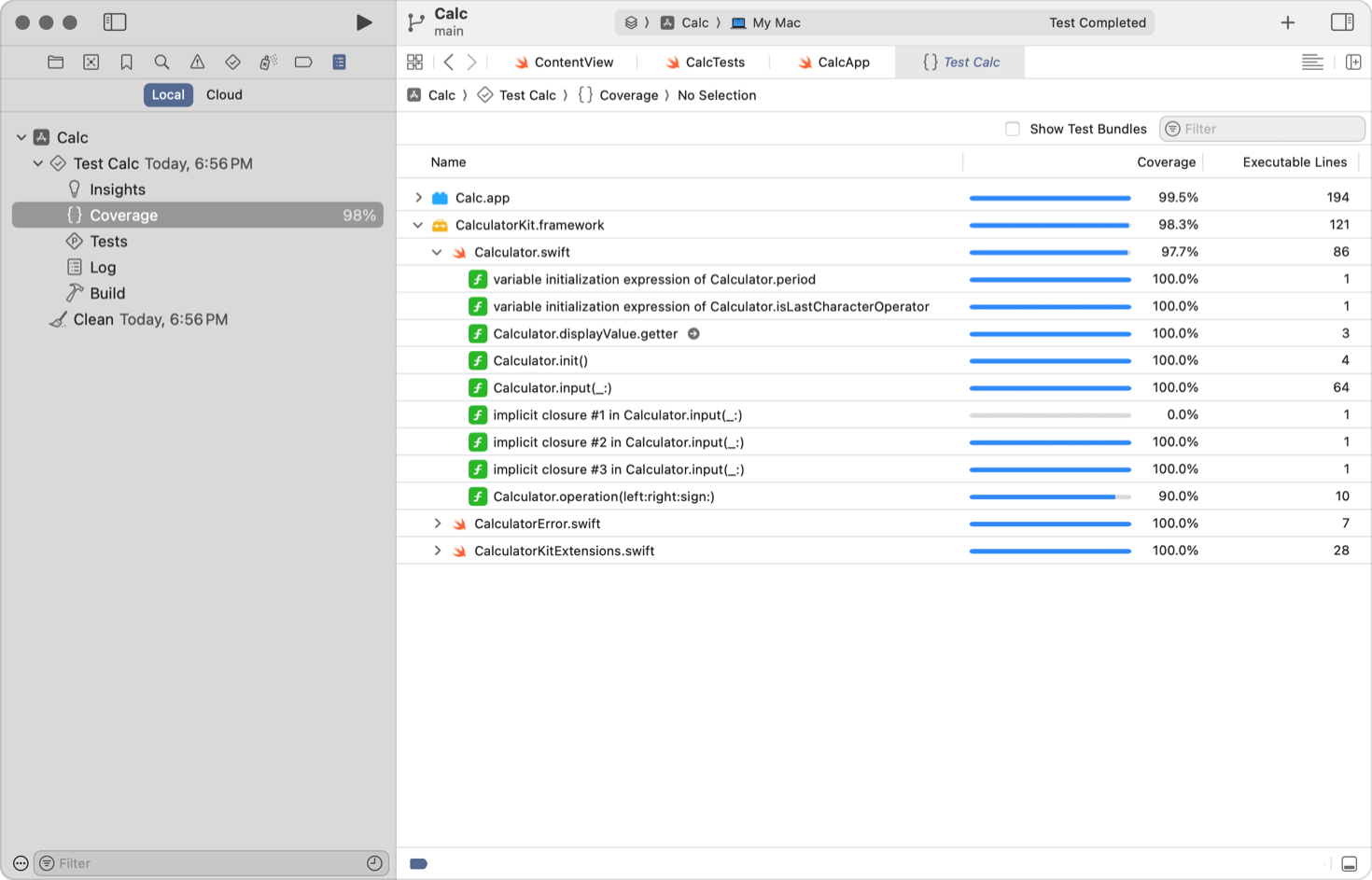
နောက်ထပ် အရေးကြီးသော Metric တစ်ခုမှာ Code Coverage ဖြစ်ပါသည်။ ရေးသားထားသော Test များက Code base ၏ ဘယ်လောက် ရာခိုင်နှုန်းကို လွှမ်းခြုံနိုင်သလဲ (Execute လုပ်သွားသလဲ) ဆိုတာကို တိုင်းတာပါသည်။
Code Coverage မြင့်မားခြင်းက Bug ကင်းစင်ကြောင်း အာမခံချက် မပေးနိုင်သော်လည်း၊ Coverage နိမ့်ပါက ထို Code သည် ပြောင်းလဲမှု ပြုလုပ်ရန် အန္တရာယ်များကြောင်း (High Risk) ညွှန်ပြနေပါသည်။ Standard အနေဖြင့် 80% အထက် ရှိထားရန် အကြံပြုလေ့ ရှိပါသည်။
Code Coverage ကို ရရှိရန် အတွက် Unit Test များကို ထည့်သွင်းရေးသားထားရမည် ဖြစ်သည်။ ပုံမှန် အားဖြင့် Unit Test run ပြီး code coverage ဘယ်လောက်ရှိလဲ တွက်ချက်ပေးပါသည်။ ဥပမာ XCode တွင် code coverage အတွက် ပါဝင်ပြီးသားဖြစ်သည်။
၆.၉ Defensive Programming and Error Handling
Software Construction တွင် Code ရေးသားခြင်းသည် ကားမောင်းရသကဲ့သို့ ဖြစ်သည်။ ကိုယ်က စည်းကမ်းတကျ မောင်းနေရုံဖြင့် မလုံလောက်ပါ။ အခြား ကားများ (External Systems, Users) က ဝင်တိုက်နိုင်သည် ဆိုသော အသိဖြင့် သတိထား မောင်းနှင်ရပါသည်။ ၎င်းကို Defensive Programming ဟု ခေါ်သည်။
Error Handling အပိုင်းကို Indentation (စာကြောင်းခွာမှု) များပြီး ဖတ်ရခက်နေသည့်အတွက်၊ ယခင် Defensive Programming အပိုင်းကဲ့သို့ ရှင်းလင်းသော Format ဖြင့် ပြန်လည် ပြင်ဆင်ပေးထားပါသည်။
Defensive Programming
"လောကကြီးက မရိုးရှင်းဘူး" ဆိုတဲ့ အတွေးနဲ့ Code ရေးပါ။ User တွေက အမြဲတမ်း မှန်ကန်တဲ့ Data ထည့်မယ်လို့ မမျှော်လင့်ပါနဲ့။ Network က အမြဲ ကောင်းနေမယ်၊ Database က အမြဲ အလုပ်လုပ်နေမယ်လို့ မယူဆပါနဲ့။
Defensive Programming ၏ အဓိက ရည်ရွယ်ချက်မှာ "Garbage in, nothing out" (အမှိုက်ဝင်လာရင် လက်မခံဘူး၊ Error တက်ပြီး System ပျက်မသွားစေဘူး) ဖြစ်အောင် ကာကွယ်ခြင်း ဖြစ်သည်။
Key Techniques:
1. Input Validation (At the Boundary)
အိမ်ထဲကို လူစိမ်း မဝင်ခင် တံခါးဝက စစ်သလိုပါပဲ။ Function တစ်ခုထဲကို Data ဝင်လာပြီ ဆိုတာနဲ့ ချက်ချင်း စစ်ဆေးပါ။ Null ဖြစ်နေလား၊ Format မှားနေလား၊ Negative Number တွေ ပါနေလား စစ်ပါ။ အတွင်းပိုင်း Logic ရောက်မှ စစ်တာ နောက်ကျလွန်းနေပါပြီ။
2. Guard Clauses (Early Return)
Nested if-else တွေ အများကြီး သုံးမယ့်အစား၊ အခြေအနေ မမှန်တာနဲ့ Function ကနေ ချက်ချင်း ထွက် (Return) ခိုင်းပါ။ ဒါက Code ကို ဖတ်ရလွယ်ကူစေပါတယ်။
Bad (Deep Nesting)
function processPayment(user) {
  if (user != null) {
    if (user.hasBalance) {
      if (user.isActive) {
        // Process Payment logic here...
      }
    }
  }
}
Good (Guard Clauses)
function processPayment(user) {
  if (user == null) return;
  if (!user.hasBalance) return;
  if (!user.isActive) return;

  // Process Payment (Logic က ရှင်းသွားပြီ)
}
3. Fail Fast
ပြဿနာ ရှိနေရင် ဖုံးဖိမထားပါနဲ့။ ရှေ့ဆက် အလုပ်လုပ်ရင် Data တွေ ပိုမှားကုန်နိုင်တဲ့ အတွက် ချက်ချင်း Error တက်ခိုင်းလိုက်တာ (Throw Exception) က ပိုကောင်းပါတယ်။
Error Handling
Defensive Programming က ပြဿနာ မဖြစ်အောင် ကြိုတင် ကာကွယ်တာ ဖြစ်ပြီး၊ Error Handling ကတော့ တကယ် ဖြစ်လာတဲ့အခါ Application ကြီး ပိတ်ကျမသွားအောင် (Crash မဖြစ်အောင်) ထိန်းကျောင်းတာ ဖြစ်သည်။
1. Graceful Degradation
System တစ်ခုလုံး ပျက်သွားမယ့်အစား၊ မရတဲ့ အပိုင်းကို ပိတ်ပြီး ကျန်တာ ဆက်လုပ်ခိုင်းပါ။
Example: Shopping App မှာ Recommendation Engine ပျက်နေရင် App ကြီး Error တက်ပြီး ပိတ်သွားမယ့်အစား၊ "Best Sellers" ဆိုတဲ့ ပုံသေ List ကို အစားထိုး ပြောင်းပြပေးလိုက်တာမျိုးပါ။ User အနေနဲ့ System ပျက်နေမှန်းတောင် သိလိုက်မှာ မဟုတ်ပါဘူး။
2. User-Friendly Messages
User ကို နားလည်လွယ်တဲ့ စကားနဲ့ ပြောပြပါ။ Technical Term တွေ လုံးဝ မပြပါနဲ့။
- Bad:
Error 500: NullReferenceException at Line 45.(User ကြောက်သွားပါလိမ့်မယ်) - Good: "Something went wrong regarding your request. Please try again later."
3. Logging (For Developers)
User ကို ယဉ်ကျေးစွာ ပြောပြရပေမယ့်၊ Developer တွေအတွက်တော့ အသေးစိတ် လိုအပ်ပါတယ်။ Log File ထဲမှာ အောက်ပါတို့ကို မဖြစ်မနေ မှတ်တမ်းတင်ထားရပါမယ်။
- Timestamp: ဘယ်အချိန်မှာ ဖြစ်တာလဲ။
- Context: ဘယ် User သုံးနေတုန်း ဖြစ်တာလဲ။ (Request ID, User ID)
- Stack Trace: Code ဘယ်ကြောင်းမှာ Error တက်တာလဲ။
Summary: Defensive Programming ဆိုတာ "မယုံကြည်မှု" (Paranoia) ကို အခြေခံပြီး၊ Error Handling ဆိုတာ "တာဝန်ယူမှု" (Responsibility) ကို အခြေခံထားပါတယ်။
၆.၁၀ Documentation and Self-Documenting Code
Software Engineering တွင် အမှန်တရား တစ်ခုရှိပါသည်။
"Code tells you HOW, Documentation tells you WHY."
Documentation မရှိသော Codebase သည် "မြေပုံမပါသော တောအုပ်ကြီး" နှင့် တူပါသည်။ လမ်းပျောက်ရန် လွယ်ကူပြီး၊ အန္တရာယ် များလှပါသည်။ Developer အများစုသည် Code ရေးရန် စိတ်အားထက်သန်ကြသော်လည်း၊ Documentation ရေးရန် ပျင်းရိတတ်ကြပါသည်။ သို့သော် Project တစ်ခု ရေရှည် ရပ်တည်နိုင်ရန် documentation သည် အရေးကြီးသည့် အသက်သွေးကြော ဖြစ်ပါသည်။
1. Self-Documenting Code
Documentation ရေးရန် အချိန်မပေးနိုင်ပါက၊ အကောင်းဆုံး နည်းလမ်းမှာ Self-Documenting Code ရေးခြင်း ဖြစ်သည်။ Comment များကို ဖတ်စရာ မလိုဘဲ၊ Code ကို ဝတ္ထုတစ်ပုဒ် ဖတ်သကဲ့သို့ ဖတ်လိုက်သည်နှင့် နားလည်နေရပါမည်။
Key Principles:
- Intent-Revealing Names: Variable နာမည်သည် "သူဘာလဲ" ဆိုတာထက် "သူဘာလုပ်ဖို့လဲ" (Intent) ကို ဖော်ပြသင့်သည်။
- Avoid Magic Numbers: ဂဏန်းတွေကို ဒီအတိုင်း မသုံးပါနှင့်။ Constant ကြေညာပြီး နာမည်တပ်သုံးပါ။
- Type Safety: TypeScript ၏ Type definition များသည် အကောင်းဆုံး Documentation များ ဖြစ်ကြသည်။
interfaceသို့မဟုတ်typeကို ကြည့်လိုက်ရုံဖြင့် Data ပုံစံကို သိရှိနိုင်ပါသည်။
Example (TypeScript):
Bad Code (Cryptic & Magic Numbers)
// ဘာလုပ်မှန်း မသိရ၊ 86400 က ဘာလဲ မသိရ၊ Type က any ဖြစ်နေသည်
function c(d: any): number {
  return d * 86400;
}
Good Code (Self-Documenting)
const SECONDS_IN_DAY = 86400;

function convertDaysToSeconds(days: number): number {
  return days * SECONDS_IN_DAY;
}
2. The Art of Code Comments
Comment ရေးခြင်းသည် အနုပညာ တစ်ခုပါ။ အများကြီး ရေးတိုင်း မကောင်းပါ။ မှားယွင်းနေသော Comment (Outdated Comment) သည် Comment မရှိတာထက် ပိုဆိုးပါသည်။
Rule of Thumb
Code က "What" (ဘာလုပ်နေလဲ) ကို ပြောပြနေပြီးသား ဖြစ်သည့်အတွက်၊ Comment တွင် "Why" (ဘာကြောင့် ဒီလို ဆုံးဖြတ်လိုက်ရတာလဲ) ဆိုတာကိုပဲ ရေးပါ။
Example (TypeScript):
// Bad Comment (Redundant)
// i ကို 1 တိုးသည်
i++;

// Bad Comment (Explaining Syntax)
// Loop through the list backward
for (let i = items.length - 1; i >= 0; i--) { ... }

// Good Comment (Explaining Business Logic / Why)
// We iterate backward because removing items from the array while iterating forward
// would shift indices and cause a bug in item processing.
for (let i = items.length - 1; i >= 0; i--) { ... }
Warning: Code ကို ပြင်တိုင်း Comment ကိုပါ လိုက်ပြင်ဖို့ မမေ့ပါနှင့်။ Code နှင့် Comment မကိုက်ညီတော့သည့် အချိန်သည် ပြဿနာ စတက် တော့မှာပါ။
3. AI-Assisted Documentation
ယနေ့ခေတ်တွင် Documentation ရေးရာ၌ AI Tools (ChatGPT, Copilot, GitHub Copilot) များသည် အလွန် အစွမ်းထက်သော လက်ထောက်များ ဖြစ်လာပါသည်။ Developer များ ပျင်းရိသည့် အလုပ်ကို AI က ကူညီပေးနိုင်ပါသည်။
AI ကို ဘာတွေ ခိုင်းလို့ရလဲ:
- Generate JSDoc/TSDoc: Function တစ်ခု ရေးပြီးပါက AI ကို "Write JSDoc for this function" ဟု ခိုင်းလိုက်လျှင် Parameter များနှင့် Return Type များကို ရှင်းပြထားသော Comment များကို စက္ကန့်ပိုင်းအတွင်း ရေးပေးနိုင်ပါသည်။
- Explain Complex Regex: ရှုပ်ထွေးသော Regular Expression များကို AI ကို ရှင်းပြခိုင်းပြီး၊ ထိုရှင်းပြချက်ကို Comment အဖြစ် ပြန်ထည့်ထားနိုင်ပါသည်။
- Draft README: Project ၏ အကြမ်းဖျင်း သဘောတရားကို ပြောပြပြီး README File မူကြမ်း ရေးခိုင်းနိုင်ပါသည်။
- API Document: AI ကို code ဖတ်ခိုင်းပြီး API Request, Response များကို ရေးခိုင်း နိုင်ပါသည်။
Example of AI Generated Documentation:
Developer ရေးထားသည့် Code
function calculateDiscount(price: number, type: 'vip' | 'regular'): number {
    return type === 'vip' ? price * 0.8 : price * 0.95;
}
AI က ဖြည့်စွက်ပေးသော Documentation:
/**
 * Calculates the final price after applying a discount based on user type.
 * @param price - The original price of the item.
 * @param type - The classification of the customer ('vip' gets 20%, 'regular' gets 5%).
 * @returns The final price after discount.
 */
function calculateDiscount(price: number, type: 'vip' | 'regular'): number {
    return type === 'vip' ? price * 0.8 : price * 0.95;
}
သတိပြုရန်: AI ရေးပေးသော စာများသည် တခါတရံ လိုသည်ထက် ပိုနေတတ်သလို၊ အမှားများလည်း ပါနိုင်ပါသည်။ ထို့ကြောင့် AI ရေးသမျှကို မျက်စိစုံမှိတ် လက်မခံဘဲ၊ လူကိုယ်တိုင် ပြန်လည် စစ်ဆေး (Review) ရန် လိုအပ်ပါသည်။
4. External Documentation (The Manual)
Code ထဲတွင် ရေးရုံနှင့် မလုံလောက်သော အရာများ ရှိပါသည်။ ၎င်းတို့အတွက် သီးသန့် စာရွက်စာတမ်းများ လိုအပ်ပါသည်။
- README File: Project တစ်ခု၏ ဧည့်ခန်းပါ။ ဒီ Project က ဘာလုပ်တာလဲ၊ ဘယ်လို Run ရမလဲ (Setup Guide) ဆိုတာ မဖြစ်မနေ ပါရပါမည်။
- API Documentation: Backend နှင့် Frontend ချိတ်ဆက်ရန်အတွက် Swagger/OpenAPI ကဲ့သို့သော Standard များ သုံးပြီး Document ထုတ်ပေးရပါမည်။ လူသုံးများသည့် PostMan ဖြင့်လည်း Documentation လုပ်ထားသင့်သည်။ ထို အခါ API ကို လွယ်လွယ်ကူကူ စမ်းနိုင်ပြီး နားလည် သဘောပေါက်နိုင်ပါလိမ့်မည်။
- Architecture Decision Records (ADRs): ဒါက Senior Developer များအတွက် အရေးကြီးဆုံးပါ။ "ဘာကြောင့် ငါတို့ SQL ကို မသုံးဘဲ Mongo DB ကို ရွေးခဲ့တာလဲ" ဆိုသည့် သမိုင်းကြောင်းနှင့် ဆုံးဖြတ်ချက် (Design Decisions) များကို မှတ်တမ်းတင်ထားခြင်း ဖြစ်သည်။
5. The "Bus Factor"
Documentation ၏ အရေးပါပုံကို "Bus Factor" ဖြင့် တိုင်းတာလေ့ ရှိပါသည်။
"သင့် Team ထဲက Code အကြောင်း အသိဆုံး လူတစ်ယောက် ကားတိုက်ခံရလို့ (သို့မဟုတ် အလုပ်ထွက်သွားလို့) ရုတ်တရက် ပျောက်သွားလျှင်၊ Project ကြီး ဆက်သွားနိုင်မလား၊ ရပ်သွားမလား?"
Documentation ကောင်းကောင်း ရှိထားခြင်းက Team Member တစ်ယောက်တည်းအပေါ် မှီခိုနေရခြင်း ကို လျှော့ချပေးပြီး၊ Project ကို ရေရှည် ရှင်သန်စေပါသည်။